Don't miss our New reseller offer - up to 20% OFF!

IPTV Reseller Support Ticket Triage: Labels and Severity

An IPTV Reseller Support Ticket should be sorted by three things before anyone tries to fix it: what kind of fault it is, how many people it affects, and who is responsible for the next move. Get those three fields right when a ticket arrives and most of the delay in reseller support goes away. The ticket goes straight to the person who can act on it, instead of bouncing between you, a sub-reseller and the upstream provider while the customer waits.
Severity is where most setups go wrong. It’s tempting to rank tickets by how upset the customer sounds, but an angry message about one buffering category is a smaller problem than a polite note saying three customers can’t log in at all. Severity should measure reach and whether anything still works. The customer’s tone can change how you word your reply. It shouldn’t change where the ticket sits in the queue.
Start With the Fields, Not the Inbox
IPTV Panel Resellers take support requests through all sorts of channels: messaging apps, email, a contact form, sometimes a sub-reseller forwarding a screenshot. The channel doesn’t matter much. What matters is that every request becomes a record with the same few fields filled in before triage starts.
At minimum, a ticket needs the line username or account ID, the device and app being used, a short description of what happened and roughly when it started, and whether anyone else in the household or customer base is affected. That last field gets skipped most often, and it’s the one that tells you whether you’re looking at one customer’s problem or the start of a wider fault.
A request that arrives without a line ID can’t be triaged properly, because you can’t check expiry, connection limits or credit history against it. Don’t give it a label yet. Put it in an “awaiting details” status, ask for the missing information once in a clear message, and triage it when the reply comes back. If you label tickets before you have the facts, the labels end up guessed, and guessed labels are worse than none because they send work to the wrong person.
A Label Set Built Around Where the Fault Lives
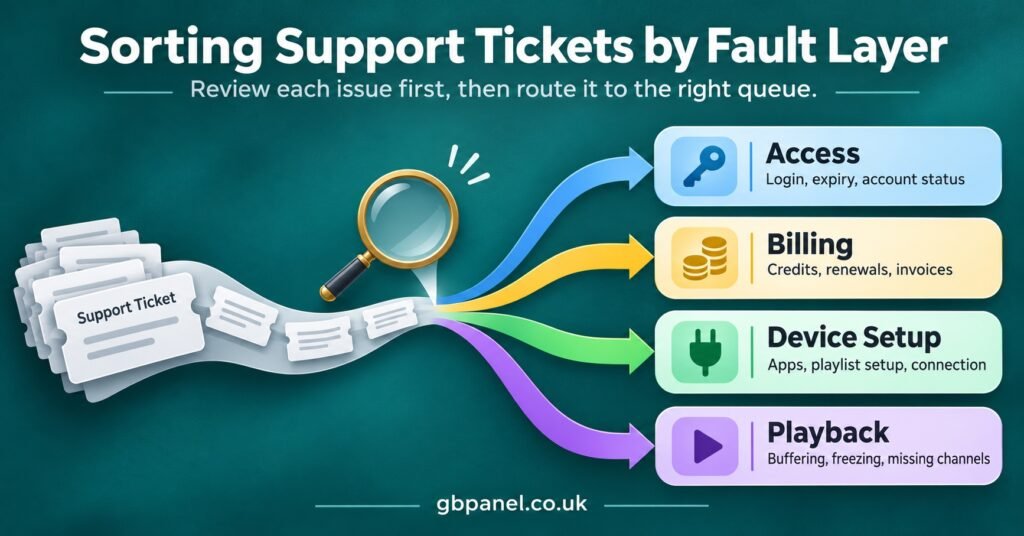
The most useful labels describe the layer where the problem sits, not how the customer feels about it. Labels such as “urgent”, “complaint” or “VIP” tell you nothing about who can fix the issue. Labels based on layers do, because each layer has a natural owner.
A workable top-level set for most reseller operations looks like this:
- Access: login failures, wrong credentials, expired lines, maximum connections reached
- Credits and billing: renewals that didn’t apply, credits deducted unexpectedly, payment confirmed but line not extended
- Device and app setup: installation, playlist or portal entry, settings on a new device
- Playback: buffering, freezing, missing guide data, audio out of sync
- Panel: the reseller or a sub-reseller can’t reach the dashboard, create lines or use a permission they should have
- Content and service requests: questions about what the service includes, which go to the provider without promises from you
Give each ticket one primary label. If a customer reports a login failure and buffering in the same message, label it by the issue that blocks them most, then note the second issue in the ticket body or split it into two tickets. When one ticket carries two primary labels, nobody is sure who should pick it up first, and that undoes the point of labelling.
Secondary tags work well for detail you’ll want to filter by later, such as device type or app name, without changing who owns the work. Keep them optional. Primary labels should stay few enough that anyone on your team can apply them correctly without checking a reference sheet each time.
The content label needs a firm rule behind it. A IPTV reseller panel is a delivery and account management tool, and having one doesn’t prove any rights to the programming carried over it. When customers ask for specific programming, the honest answer is to pass the question to your provider and avoid promising anything you can’t verify is properly licensed.
Pro tip: Write a one-sentence definition for each label, with one example of what belongs in it and one example of what doesn’t. Pin it wherever your team works. Most labelling arguments come from the borderline cases, and a written example settles them faster than a discussion does.
IPTV Reseller Support Ticket Severity Levels
Labels tell you who should look at the ticket. Severity tells you in what order. Four levels are enough for nearly every reseller operation, and each one should be defined by reach and remaining function rather than by the type of fault.
| Severity | What it means | Typical example |
|---|---|---|
| S1 Critical | Many lines or the whole panel affected, or nobody can activate or renew | Several unrelated customers report login failures within the same hour |
| S2 High | One customer fully unable to use the service, or a business function blocked | A paid renewal didn’t extend the line, or a sub-reseller can’t create accounts |
| S3 Normal | Partial problem with a working alternative | Guide data missing on one device while others display it correctly |
| S4 Low | Questions, how-to requests and changes with no fault | A customer wants help setting up a second device |
Two rules keep these levels from drifting. The first is clustering. When a second ticket arrives with the same label and similar symptoms, check whether the two are connected. Two playback complaints from customers on the same server within a short window may be one incident, not two separate S3 tickets, and it should be raised to S1 as a single parent issue with the individual tickets linked underneath.
The second rule is that time can raise severity. A line that expires tomorrow with a renewal stuck in pending is more serious than the same fault with three weeks left. You don’t need a complicated formula for this. Allow whoever triages the ticket to raise it one level when a deadline is close, and record the reason in a short note.
Be careful about publishing response times. It’s easy to borrow figures from larger operations, but a target only helps if your staffing can meet it in the evenings and at weekends, when many reseller tickets come in. Set internal targets per severity based on the hours you actually cover, measure whether you hit them for a month, and only then decide what, if anything, to promise customers.
Ownership: One Name on Every Ticket
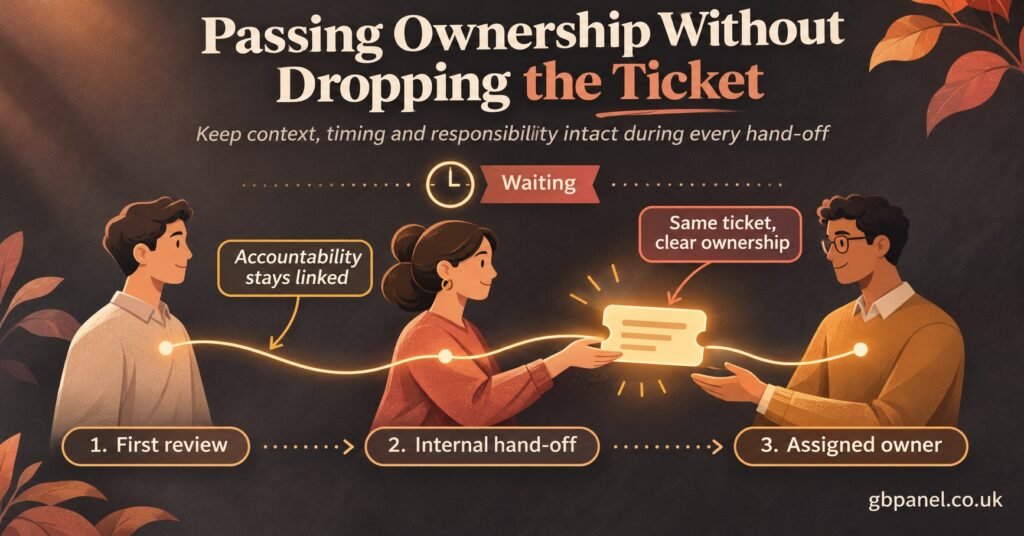
Ownership is often confused with doing the fix. The owner of a ticket is the person accountable for the next update, and that may not be the person who solves the problem. If a playback fault sits on the provider’s servers, you can’t fix it, but you still own the ticket because you own the relationship with the customer.
A simple ownership map by label prevents most hand-off confusion:
- Access, device and app setup: front-line support, whoever handles the customer directly
- Credits and billing: the reseller account holder or someone with credit permissions, because fixing it may mean adjusting balances
- Playback faults affecting several customers: front-line support owns communication, and the issue is escalated to the provider for the technical fix
- Panel problems: the reseller account holder, since dashboard and permission issues usually need someone with full access
- Content and service requests: front-line support, with the question passed to the provider
When you escalate upstream, the ticket doesn’t leave your queue. Change its status to show you’re waiting on the provider, record what you sent and when, and set yourself a time to check back. Tickets that “belong to the provider now” are the ones customers end up chasing three days later, with nobody on your side able to say what’s happening.
When a sub-reseller sits between you and the customer
Sub-reseller arrangements add another layer, so the ownership rule has to be explicit. A sub-reseller’s customers should normally raise tickets with the sub-reseller, who owns first-line support for them. The parent reseller owns tickets the sub-reseller raises, especially panel and credit issues that stop them trading.
Agree in advance whether the parent may ever contact a sub-reseller’s customer directly. Many arrangements say no, because that relationship is the sub-reseller’s business. If that’s your arrangement, the parent’s job during an incident is to give the sub-reseller clear, prompt updates they can pass on. Credit disputes between parent and sub-reseller are worth tracking in a separate queue from customer faults, so commercial disagreements don’t sit alongside a customer who just wants to watch something tonight.
Statuses That Show Who Is Waiting
Labels and severity describe the ticket. Status describes where it is right now. Keep statuses few and make each one answer the question “who has to act next?”
A practical set is New, Triaged, In progress, Waiting on customer, Waiting on provider, Resolved and Closed. Resolved and Closed shouldn’t be merged. Resolved means you believe the fault is fixed. Closed means the customer has confirmed it, or a reasonable period has passed with no reply. Keeping them separate stops tickets disappearing just because someone on your side thinks the job is done.
Decide your own auto-close period for tickets waiting on the customer, and tell customers about it in your follow-up message so the closure doesn’t come as a surprise. A reply after closure should reopen the original ticket rather than start a new one, so the history stays in one place.
A Worked Triage Example
Here’s a hypothetical evening queue to show how the pieces fit together. Four tickets arrive within about an hour.
The first is from a customer who says their app shows “authorisation failed” on a living room device. Their line ID is included, and the panel shows the line is active with connections free. That’s labelled Access, rated S2 because one customer can’t watch anything, and owned by front-line support.
The second and third come from two customers who don’t know each other, both describing freezing on the same group of streams. Each looks like an S3 Playback ticket on its own. Seen together, they suggest a shared fault. The person triaging creates a parent incident at S1, links both tickets to it, escalates to the provider with timestamps and examples, and sets both customer tickets to waiting on provider. Front-line support keeps ownership of the customer updates.
The fourth comes from a sub-reseller who says the panel won’t let them create new lines even though their credit balance looks fine. That’s labelled Panel, rated S2 because it blocks their sales, and owned by the parent reseller account holder, who checks permissions before assuming a provider fault.
None of these decisions needed technical expertise. They needed the minimum fields filled in, a label based on the fault layer, a severity based on reach, and a named owner. That’s the whole system.
Keeping the System Honest After Launch
Any label scheme drifts once real tickets start arriving. Set aside time each month to look at ticket counts by label and severity, and treat what you find as feedback on the scheme as well as on the service.
If your catch-all or “other” bucket becomes one of the bigger groups, your labels don’t match the problems customers actually have, and a new label is probably needed. If one label almost never gets used, merge it into a neighbour. If staff often change a ticket’s severity after first triage, the definitions are too vague, and the S2 and S3 examples need tightening.
Recurring labels also point to fixes that stop tickets arriving at all. A steady flow of device setup tickets usually means your onboarding instructions need work. Frequent credits and billing tickets may point to renewals being processed by hand. The ticket system is most useful when it shows you which problems to remove, not only which ones to answer faster. If you’re reviewing how your panel supports this kind of operation, GB Panel’s IPTV reseller panel services are a sensible place to start comparing what your dashboard gives you.
Before you switch on a new triage scheme, run through these points:
- Every label has a written one-line definition and a borderline example
- Each label maps to a named owner role, including outside normal working hours
- Severity definitions refer to reach and remaining function, never to customer tone
- Escalations to the provider keep the ticket in your queue with a check-back time
- Sub-reseller tickets have an agreed route, and credit disputes have their own queue
- Resolved and Closed are separate statuses, with an auto-close period you tell customers about
- A monthly review date is in the calendar before the first ticket is labelled
Frequently Asked Questions
Should customers choose the severity of their own ticket?
It’s better not to. Customers can’t see how many other people are affected, so their rating reflects how frustrated they are rather than how far the fault reaches. You can ask them whether they can watch anything at all, which helps with triage, but the severity itself should be set by whoever triages the ticket.
How many labels are too many?
If your team needs to check a reference sheet to choose a primary label, there are too many. Six to eight top-level labels covers most reseller operations comfortably. Extra detail belongs in optional secondary tags.
What should happen when the provider doesn’t reply to an escalation?
The ticket stays with you and stays visible. Follow up at the check-back time you set, keep the customer updated even when there’s nothing new to report, and record each follow-up. If the same provider repeatedly misses escalations, those records give you the evidence you need when deciding whether that relationship is working.
Is a spreadsheet good enough, or do I need helpdesk software?
A shared spreadsheet with the fields, labels, severity, owner and status columns described here can work for a single operator with modest volume. Once two or more people handle tickets, or sub-resellers start raising them, dedicated helpdesk software becomes worth considering, mainly for assignment, history and reopening closed tickets without losing context.
Can the same customer have several open tickets?
Yes, if the problems are genuinely different, such as a billing question and an unrelated device setup request. Repeated messages about the same fault should be merged into the original ticket so the history stays together and nobody works the same issue twice.
Making the System Stick
A well-run IPTV Reseller Support Ticket process doesn’t depend on fast typing or long hours. It depends on deciding three things consistently: which layer the fault sits in, how far it reaches, and whose name is on the next update. Labels, severity and ownership each answer one of those questions, and once they’re defined in writing, anyone on your team can triage a ticket the same way.
The scheme won’t be perfect on day one, and it doesn’t need to be. Start with the minimum fields and a small label set, run it for a month, then let the review show you what to tighten. The tickets you stop receiving because a recurring cause got fixed are the best sign the system is working.
[…] keep the number of priority levels small. Four is plenty for most IPTV panel resellers. If you already sort tickets by severity, use the same levels so your team doesn’t have to […]