Don't miss our New reseller offer - up to 20% OFF!

IPTV Reseller SLA Template for UK Panel Businesses 2026

An IPTV Reseller SLA works when it promises how quickly you will respond and what happens next. It should not promise how quickly every fault will be fixed, because many faults sit with the upstream provider and are outside your control. A usable one has four parts: the hours you actually cover, a small set of priority levels, a first-response target and update interval for each level, and a named escalation route for when the first reply doesn’t solve the problem. Below you’ll find all four, followed by a sample policy you can adapt and publish.
Set your targets from the hours you can really staff, not from what a large telecoms company advertises. A sole trader who answers messages from 9am to 10pm can keep a two-hour promise inside those hours. The same person will break a “24/7 support” claim the first time a server problem happens at 3am. Customers usually forgive a slow fix when someone tells them what’s going on. They are far less forgiving when they’ve been promised a reply that never comes. The template below is built on that point.
The Promise You Can Actually Keep
Before writing any targets, divide your support work into what you control and what you only pass on. As a IPTV panel reseller, you usually control account creation, expiry dates, connection limits, credit top-ups, login details, device setup guidance and the customer conversation. The streams themselves, server capacity, the electronic programme guide data and app updates normally belong to your provider or software vendor.
This split decides what your service level agreement can say. You can commit to replying, diagnosing, fixing account-side problems and passing server-side faults up the chain within a set time. For server-side faults, you can commit to keeping the customer informed. You can’t honestly commit to resolving them in a fixed time unless your provider has made that commitment to you in writing, and most reseller arrangements don’t include one.
Resellers working under a parent account add one more layer. A sub-reseller depends on the parent reseller for credits and escalation, so a sub-reseller’s customer-facing promise can’t be faster than the support the parent actually provides. If you aren’t sure where your account sits, the difference is explained in how resellers and sub-resellers relate to the panel provider.
Response, Update and Resolution Are Three Different Clocks
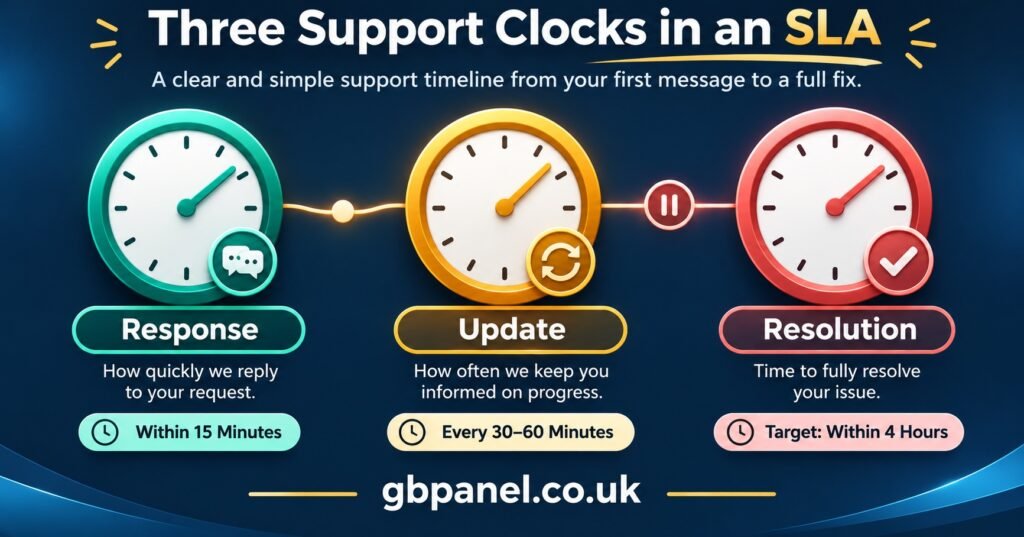
Most weak SLAs fail because they track one time and call it support. In practice there are three separate times, and your policy should name each one.
The response clock runs from the moment a customer contacts you to the moment a person (not an auto-reply) acknowledges the issue and asks for or confirms the details needed. This is the time you can control most reliably, and it’s the one customers notice first.
The update clock covers the gap between messages while an issue stays open. A customer whose service has been down for four hours is reassured by updates every hour, even when nothing has changed. Silence is what turns a technical fault into a complaint.
The resolution clock measures how long the fix takes. For account-side problems, such as an expired line, a wrong connection limit or a password reset, you can set resolution targets. For provider-side faults, the honest wording is “we will escalate within X and update you every Y until it’s resolved”.
Your policy should also say when a clock pauses. The usual pause is when you’re waiting for the customer: the device model, a screenshot of the error, or confirmation that they’ve restarted the router. Without a pause rule, every unanswered request for information counts as a missed target against you.
Setting Response Targets From Your Real Cover Hours
Start by writing down your cover hours in UK time, including weekends and bank holidays. All the targets below apply only inside those hours. Anything received outside them starts the clock when cover resumes. State that clearly in the policy, or customers will measure you against the clock on their own phone.
Next, keep the number of priority levels small. Four is plenty for most IPTV panel resellers. If you already sort tickets by severity, use the same levels so your team doesn’t have to translate between two systems. The support ticket triage and severity guide explains how to sort incoming tickets in the first place. The SLA’s job is to attach a promise to each level.
The figures in this table are examples only, not industry standards. Replace them with times you have measured yourself.
| Priority | What it typically looks like | Example first-response target |
|---|---|---|
| P1 Critical | Many customers affected at once, or no streams loading across your lines | 30 minutes within cover hours |
| P2 High | One customer has no working service at all | 2 hours within cover hours |
| P3 Normal | Service works but something is wrong: buffering on some categories, guide data missing, one device failing | 1 business day |
| P4 Request | Questions, renewals, device changes, billing queries | 2 business days |
To test whether a target is realistic, review the last month of messages and check how quickly you actually replied in each category. If you can’t measure that yet, run the targets internally for four weeks before publishing them. A target you meet nine times out of ten is worth more than a faster one you meet half the time.
Pro tip: Set your P1 update interval at the same time as the response target. If an outage affects many customers, one status message posted to your customer channel every hour saves you answering dozens of identical messages individually.
The IPTV Reseller SLA Template
The sample policy below is written in plain English so customers can read it on your website or receive it at sign-up. Replace everything in square brackets. Delete any clause you can’t keep, because a short policy you follow is better than a long one you don’t.
Support and Service Level Policy for [Business Name]
1. Who this covers. This policy applies to active subscription accounts bought directly from [Business Name]. If you bought your account through another seller, contact that seller first, because they manage your account.
2. Support hours. Our team is available [09:00 to 22:00 UK time, Monday to Sunday], excluding [list any days]. Messages received outside these hours are treated as received at the start of the next support period.
3. How to contact us. Contact us through [support channel 1] or [support channel 2]. To help us respond quickly, include your account username, the device and app you’re using, and a description or screenshot of the problem. Please don’t send your password in a message.
4. Priority levels and response targets. We sort every request into one of four levels:
- Critical (widespread service failure): first response within [30 minutes], updates every [hour] until resolved.
- High (your service isn’t working at all): first response within [2 hours], updates every [4 hours].
- Normal (service works with a fault): first response within [1 business day].
- Request (questions, renewals, changes): first response within [2 business days].
A first response means a reply from a member of our team, not an automated acknowledgement.
5. What we fix and what we escalate. We resolve account matters directly. These include activation, renewal, expiry dates, connection limits, login details and setup guidance. If the fault is with the service infrastructure, we report it to our provider within [1 hour of confirming it], keep you updated at the intervals above, and tell you when it has been fixed. We can’t guarantee a resolution time for infrastructure faults.
6. When the clock pauses. Response and resolution times pause while we’re waiting for information or action from you. They restart when you reply.
7. What this policy doesn’t cover. Problems caused by your internet connection, your home network, unsupported devices or apps, or the use of a VPN where our terms prohibit it. It also doesn’t cover accounts that have been suspended for non-payment or a breach of our terms. We’ll still tell you if we think one of these is the cause.
8. Escalation. If you haven’t had a first response within the target time, or the same fault returns within [7 days] of being marked resolved, reply with the word ESCALATE. Your request will go to [Senior Support / Owner name or role], who will respond within [4 hours within support hours].
9. Complaints. If you’re unhappy with how we handled your request, email [complaints address]. We’ll acknowledge your complaint within [2 business days] and give a full response within [14 days].
10. Your rights. Nothing in this policy affects your statutory rights as a consumer.
11. Review. We review this policy every [6 months]. Last updated: [date].
Clause 7 is the one resellers most often weaken by making it too broad. If every fault can be put down to “your internet”, customers will stop believing the rest of the policy. Keep the exclusions specific and commit to helping identify the cause even when it’s excluded. When suspension is the cause, it helps to point customers to your process for handling account suspension and reinstatement, so they know what to do next.
Escalation: Who Picks Up When the First Reply Isn’t Enough
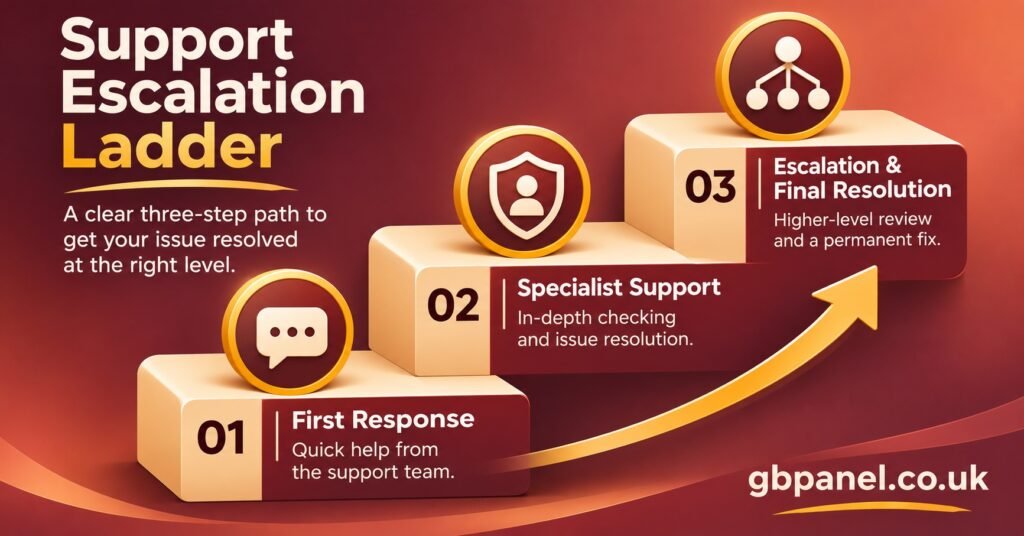
The escalation ladder is where a policy either works or falls apart. Each level needs a named role, a trigger that moves the issue up and a limit on what that level can decide.
Level 1 is whoever answers first. Their job is to confirm the account is active and within its expiry date, check the connection count, confirm the login details match, and take the customer through basic device and router checks. Level 1 should not be the person deciding refunds or offering extra days, because those decisions cost credits and need to be consistent.
Level 2 is the owner or a senior team member. Issues reach this level in three ways: a customer uses the escalation word, a fault repeats, or the issue involves money, credits or account changes that Level 1 can’t make. A sensible internal rule is that any ticket open longer than twice its response target moves up automatically, whether or not the customer asks.
Level 3 is outside your business: the provider or panel vendor. Before escalating here, record what you’ve already ruled out, which lines are affected, when the problem started and whether it affects all devices or one app. Providers generally act faster on reports that show the reseller has already done the first checks, and your escalation then contains facts rather than a forwarded complaint.
For sub-resellers, the ladder gains a step: the sub-reseller’s Level 2 escalates to the parent reseller, who then decides whether to go to the provider. Agree in writing how quickly the parent will respond to its sub-resellers. Without that, the sub-reseller’s own published targets have nothing behind them.
Whatever the level, write down when each move happened. Panel logs help to some extent, but they have limits. As the guide to what reseller panel activity logs can and can’t prove explains, retention and detail are usually set by the provider. For SLA measurement and complaint handling, keep your own record of message times alongside them.
Where UK Consumer Law Sits Underneath Your SLA
An SLA can’t reduce what UK law already gives consumers. Under the Consumer Rights Act 2015, a service supplied to a consumer must be performed with reasonable care and skill. Where no time has been agreed, it must be performed within a reasonable time. Information you give a customer about the service, including published response times they relied on when buying, can be treated as part of the contract. A target you publish but don’t intend to meet is therefore more than a marketing risk.
The same Act prevents a trader from excluding or limiting liability for those basic duties. A clause saying “we accept no responsibility for support delays of any kind” is unlikely to hold up against a consumer. The safer approach is the one in the template: realistic targets, clear exclusions for things genuinely outside your control, and a line confirming that statutory rights are unaffected. This is general information, not legal advice. If your policy includes refunds or compensation, get it checked by someone qualified.
A support policy also says nothing about whether the service itself is lawful. IPTV is a delivery method, and the legality of what’s delivered depends on proper distribution rights. A well-written SLA supports a legitimate, authorised service. It doesn’t make an unauthorised one acceptable.
Testing the Policy Before It Goes Live
Run a short dry test before publishing. It will show the gaps between what the document says and how your support actually works.
- Send a test message outside cover hours and confirm the auto-reply states when the response clock starts.
- Time three real first replies in each priority level over a week and compare them with your targets.
- Ask the person handling Level 1 to explain, without reading the policy, what they can and can’t decide.
- Send a mock ESCALATE message and check that it reaches Level 2 within the stated time.
- Confirm you have a written response-time commitment from your parent reseller or provider, or remove any clause that relies on one.
- Check that the exclusions list names specific causes rather than vague catch-alls.
- Put a review date in your calendar matching clause 11.
If any item fails, change the policy rather than hoping the team catches up. Publishing slower, accurate targets is better than discovering the gap through complaints.
Frequently Asked Questions
Should an SLA be public or sent only to customers who sign up?
Publishing it builds trust before purchase, and it holds you to the same standard for everyone. If you’re still measuring your real response times, keep it internal for a month first, then publish the version you know you can meet.
Do I need to offer compensation when a target is missed?
No law requires a fixed compensation scheme for a missed response target. Some resellers add extra days for a prolonged P1 outage as a goodwill gesture. If you do, state the rule precisely, such as “outages confirmed longer than [X hours]”, and budget for the credits it will use.
My provider has no formal SLA with me. Can I still publish one?
Yes, as long as it only covers what you control: your replies, your update intervals and your account-side fixes. Word infrastructure faults as escalation and update commitments, not resolution guarantees.
Is it acceptable to advertise 24/7 support?
Only if someone really responds at all hours. An auto-reply at 3am isn’t round-the-clock support. Stating your real hours is more credible, and customers can plan around them.
How often should response targets change?
Review them on the schedule in your policy, and also after any big change in customer numbers or staffing. If your active lines double, targets set for your old volume may stop being realistic within weeks.
Making the Promise Hold
A good IPTV Reseller SLA is modest about resolution and strict about communication. Commit to cover hours you can staff, response times you’ve measured, regular updates while a fault stays open and a clear escalation route with a named person at each step. Leave infrastructure fixes to the escalation path instead of promising a time you don’t control. Adapt the template to your figures, run the dry test, then publish it with a review date. Every six months, check whether your real support times still match what the policy says.